


Drag or drop your image here to upload
OpenClaw Deleted All Emails? A Simple Recovery Guide
OpenClaw is an AI tool that can help users manage inbox tasks, emails, and other actions through automation. Because it is designed to perform real actions, a wrong command, an overly broad cleanup task, or an unexpected mailbox operation may sometimes remove important email content.
A deep, resonant power hum emerges from the mech. A single, bright red light flickers on within its dark optical sensor, then stabilizes into a piercing glow. The giant machine begins to move, shaking off tons of debris and dirt as it slowly, powerfully, rises from its grave, servos whirring and hydraulics hissing.
HistorySee All
A deep, resonant power hum emerges from the mech. A single, bright red light flickers on within its dark optical sensor, then stabilizes into a piercing glow. The giant machine begins to move, shaking off tons of debris and dirt as it slowly, powerfully, rises from its grave, servos whirring and hydraulics hissing.
Your videos generation history will appear here.
Inspirations
See AllWhat Happens When OpenClaw Deletes Emails
When OpenClaw deletes emails, the impact may go beyond missing messages in your inbox. Because OpenClaw is designed to take real actions across connected chat apps and workflows, a cleanup task or mailbox-related action may also affect attachments, folders, and other Outlook data. In some cases, the emails may have been deleted. In others, the Outlook PST file may have become damaged or inaccessible, which can make the mailbox appear empty. OpenClaw’s official description presents it as an AI assistant that can clear your inbox and send emails, so email-related actions can directly affect mailbox content.
The Importance of Choosing the Right Tool for Email Recovery
When Outlook emails are lost, the recovery tool you choose can make a big difference. Email loss may involve not only messages, but also attachments, folders, contacts, calendar items, and PST files. A more targeted solution is usually better for scanning Outlook data, checking recoverable content, and restoring mailbox items in a usable format. Tools such as EaseUS Email Recovery Wizard are designed for this type of Outlook recovery scenario.
How to Recover Your Emails Deleted by OpenClaw?
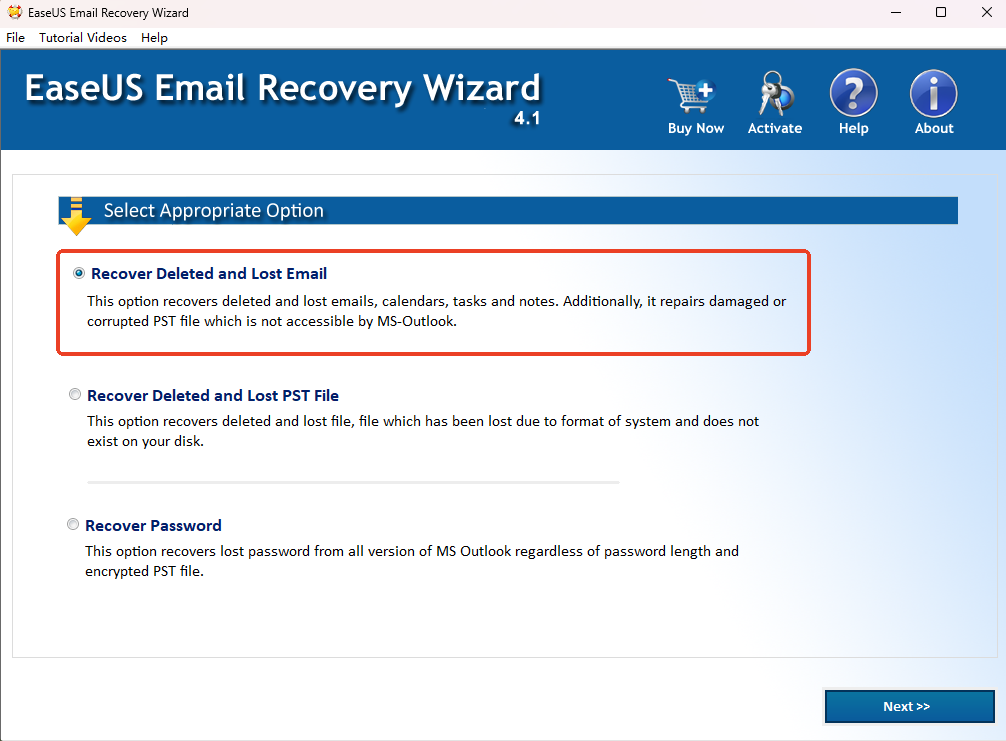
If OpenClaw deleted your Outlook emails, there may still be a chance to get them back. EaseUS Email Recovery Wizard helps you scan Outlook data files, find recoverable emails, attachments, folders, and other mailbox items, and restore them to a usable PST file. The steps below show how to use the tool to check for deleted Outlook data and recover what is still available.


Frequently Asked Questions
Have more questions? You can email service@aiease.ai, and we'll be happy to help you.
Can I recover emails deleted by OpenClaw?
Yes, in some cases you can recover emails deleted by OpenClaw. If OpenClaw deleted all emails from Outlook but the data has not been fully overwritten, recovery may still be possible. The result usually depends on whether the missing emails were stored in a PST file and whether that file is still available or damaged.
Why did OpenClaw delete all emails?
If OpenClaw deleted all emails, the cause may be an inbox cleanup task, an automation rule, or a mailbox action that was applied too broadly. In some situations, the emails may not be permanently gone, but the Outlook PST file may have become damaged or inaccessible.
What should I do first if OpenClaw deleted all emails?
If OpenClaw deleted all emails, the safest first step is to stop using the affected drive as much as possible. Continued file activity may overwrite deleted Outlook data. After that, check whether the PST file still exists and scan the Outlook data source for recoverable emails, folders, and attachments.
Can I recover attachments and folders if OpenClaw deleted Outlook emails?
Possibly. If OpenClaw deleted Outlook emails, the missing attachments and folders may also be recoverable if they were part of the same Outlook data file. When you try to recover emails deleted by OpenClaw, it is a good idea to check the scan results for mailbox folders, attachments, contacts, and other Outlook items as well.
What if I can only recover part of the emails deleted by OpenClaw?
If you can only partially recover emails deleted by OpenClaw, some of the Outlook data may have been overwritten, badly damaged, or stored in another PST file or Outlook profile. In that case, review the scan results carefully and check whether the missing mailbox content was saved in a different file or account.