• Home
  • AI Video
    • Text to Video
      Turn your text into stunning videos with AI.
    • Image to Video
      Transform static images into dynamic, engaging videos.
    • Video Effects
      Turn your image into a viral-style video with just one click.
      • AI Kiss Generator
      • AI Hug Generator
      • AI Dance Generator
    • Supported AI Models
      • Kling 2.6 Motion Control
      • Veo 3.1
      • Sora 2.0
      • Kling 2.6 Pro
      • Kling 2.1 Master
      • Hailuo 2.3
      • Seedance 1.5 Pro
      • Wan 2.5
  • Video Effects
  • AI Image
    • Image to Image
      Simply describe what you'd like to change in your image.
    • Text to Image
      Turn your ideas into stunning, realistic AI images in any style.
    • Supported AI Models
      • Nano Banana Pro
      • Seedream 4.5
      • Nano Banana
      • Flux Kontext
  • AI Tools
    • Photo Editor & Creator
    • Photo Enhancer
    • Object Remover
    • Watermark Remover
    • Background Remover
    • AI Background
    • Photo Restoration
    • AI Extender
    • AI Replacer
    • AI Recolor
    • AI Style Image Generator
    • Portrait Tools
    • Hairstyle Changer
    • Clothes Changer
    • AI Baby
    • AI Filter
    • Face Swap
    • Headshot Generator Pro
    • AI Headshot Generator
    • Passport Photo Maker
    • Video Tools
    • Video Effects
    • Video Enhancer
    • Video Face Swap
    • Video Watermark Remover
    View All
  • Pricing
Home
AI Video
    Text to Video
    Image to Video
  • Video Effects
    • AI Kiss Generator
    • AI Hug Generator
    • AI Dance Generator
  • Supported AI Models
    • Kling 2.6 Motion Control
    • Veo 3.1
    • Sora 2.0
    • Kling 2.6 Pro
    • Kling 2.1 Master
    • Hailuo 2.3
    • Seedance 1.5 Pro
    • Wan 2.5
Video Effects
AI Image
    Image to Image
    Text to Image
  • Supported AI Models
    • Nano Banana Pro
    • Seedream 4.5
    • Nano Banana
    • Flux Kontext
AI Tools
  • Photo Editor & Creator
    • Photo Enhancer
    • Object Remover
    • Watermark Remover
    • Background Remover
    • AI Background
    • Photo Restoration
    • AI Extender
    • AI Replacer
    • AI Recolor
    • AI Style Image Generator
  • Portrait Tools
    • Hairstyle Changer
    • Clothes Changer
    • AI Baby
    • AI Filter
    • Face Swap
    • Headshot Generator Pro
    • AI Headshot Generator
    • Passport Photo Maker
  • Video Tools
    • Video Effects
    • Video Enhancer
    • Video Face Swap
    • Video Watermark Remover
Pricing
Skip to content
August 14, 2024 Zoe Riley
Home » Blog » Restoration » How to Fix Old Pictures: Easiest Way to Unblur an Image

How to Fix Old Pictures: Easiest Way to Unblur an Image

In the past, we would only seek expert assistance from a studio to repair old photographs. But is it really that difficult to repair old photos? In fact, restoring old photographs comprises mostly of the following tasks: repairing damage, improving image quality, and color restoration. Now, with a few helpful tools, we can do it ourselves.

Today we are going to share an AI image quality enhancer tool – AI Ease photo enhancer to help you restore an old photo in a single click.
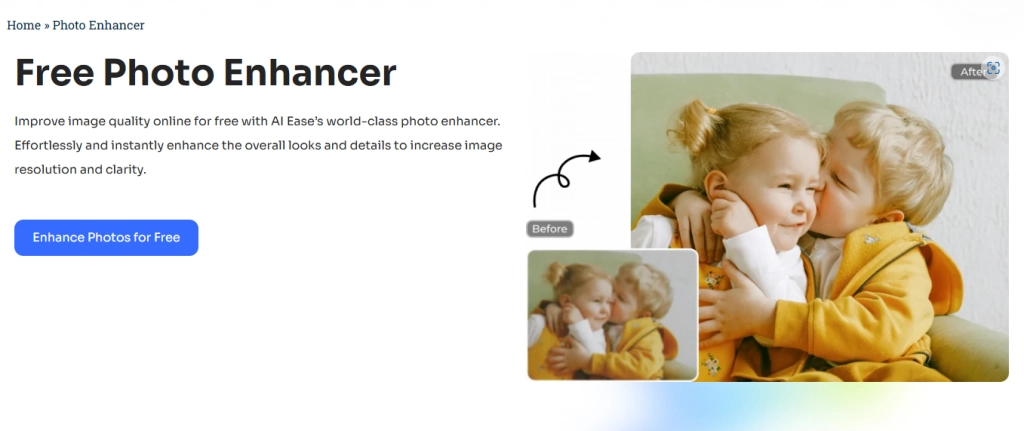
AI Ease free photo enhancer interface
Unblur your photo in a single click

AI Ease Photo Enhancer

AI Ease provides a one-stop AI repair, restoration, and colorization solution for old photos. As a full-service picture enhancer tool supplier, it promises to give a simple and intelligent solution to increase image quality. For example, photo enhancement can increase the resolution of your image in seconds. When using it to restore old photos, simply upload the image and let AI repair it by repairing faded colors, removing scratches and fractures, and colorizing the black and white picture.

How to restore old photos with AI Ease photo enhancer?

AI Ease use advanced algorithms to analyze and enhance facial details, revealing the true beauty and sharpness in every photo. Fine lines, blemishes, and imperfections are blurred, resulting in clear and lifelike faces.

Step1: Upload Old Photos

Restore old photos online for free with AI Ease photo enhancer. Just click Upload Image and choose the old photo you want to restore from devices.

Step2: Fix old photo online

AI technology lets our photo enhancer remove scratches, tears, and blemishes from old photos, restore faded colors, and enhance details.

Step3: Save and download

If the photo has been restored to your satisfaction, click “Download” to save the results in high-quality JPG or PNG format. That’s it.

Performance of AI Ease

Here is an old picture fixed by AI Ease Photo Restorer. You may see through the before-after comparison that the noise of the picture is perfectly removed.
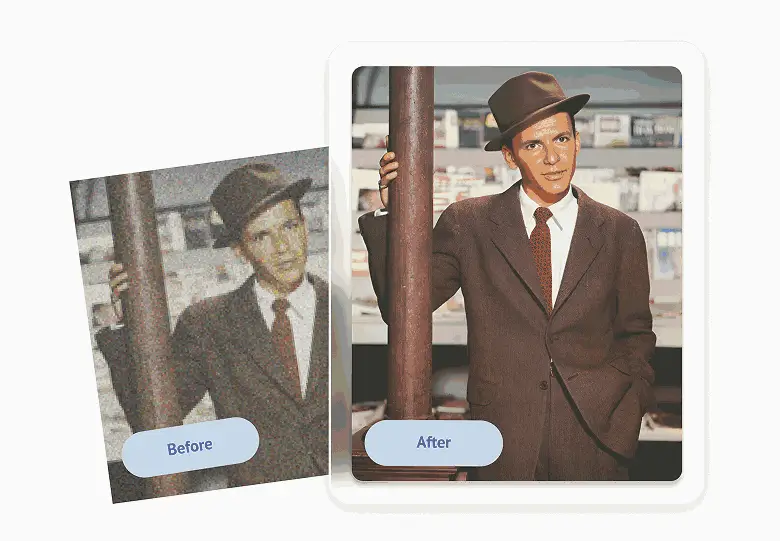
reduce noise

Reduce photo noise

Then, we can also use AI Ease to do a comprehensive restoration to the old picture, including fix the damages, add some color to the black and white photo. Our AI algorithm will automatically colorise your photo and deliver results that are natural and look like the original shots.
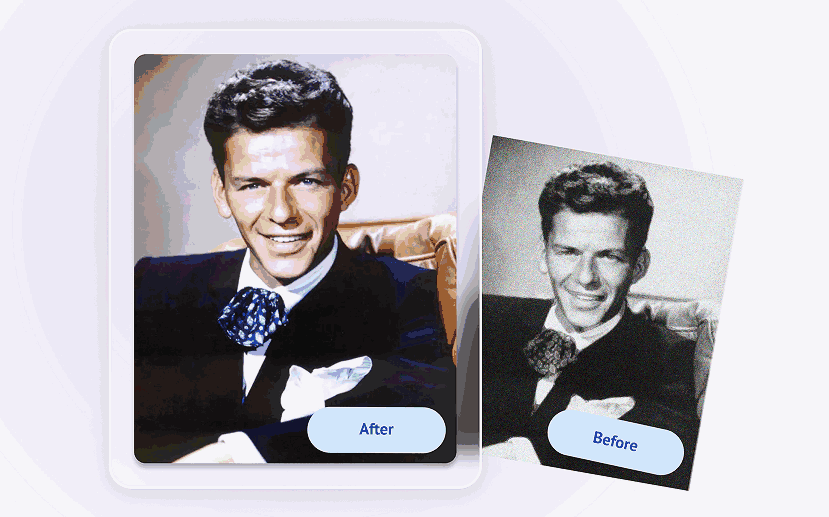
colorise your photo

Conclusion

In this article, we’ve gone through in-depth how to unblur an image in a single click for free. You can now easily enhance any photo with AI ease phot enhancer in seconds.

Don’t forget to share it with your friends if you found this blog helpful.
Categories: Restoration
GET IT ON
Google Play
AI Video Tools
  • Text to Video
  • Image to Video
  • Video Effects
  • Video Enhancer
  • Video Face Swap
  • Video Watermark Remover
  • AI Dance Video Generator
  • AI Hug Video Generator
  • AI Kissing Video Generator
  • Baby Dance AI Video Generator
  • More Tools
AI Video Models
  • Veo 3.1
  • Sora 2.0
  • Seedance 2.0
  • Seedance 1.5 Pro
  • Seedance 1.0
  • Kling 3.0
  • Kling 2.6 Motion Control
  • Kling 2.6 Pro
  • Kling 2.1
  • Hailuo 2.3
  • Wan 2.5
  • Wan 2.2
  • More Models
AI Image Tools
  • Text to Image
  • Image to Image
  • Image Filters
  • Photo Ehancer
  • Image Extender
  • Image Face Swap
  • Image Watermark Remover
  • Object Remover
  • Object Replacer
  • AI Baby Generator
  • Restore Old Photos
  • More Tools
AI Image Models
  • Nano Banana 2
  • Nano Banana Pro
  • Nano Banana
  • Gemini 3
  • Seedream 4.5
  • Seedream 4.0
  • Flux Kontext
  • Qwen Image
  • More Models
Resources
  • About Us
  • Contact Us
  • Pricing
  • FAQs
  • Blog
  • Privacy Policy
  • Cookie Policy
  • Terms of Service
  • Refund Policy
© 2023 - 2026 AIEASE, developed by CHENGDU Yile Tech Co., Ltd. All rights reserved.
English
Sign Up or Log in to Get Started
Daily Free credits
Free AI Image Generations
Free AI-Powered Image Editing
Free Image Downloads Anytime
Continue with Google
Continue with Apple
or
Continue with Email
By continuing, you agree to our
Terms of Service and Privacy Policy.
We use cookies to provide you with better experience. By continuing, you acknowledge that you have read, understood and agreed our Cookie Policy