Free AI Braces Filter Online
Instantly try braces on your own smile and preview how different brace styles may look with AIEase’s AI braces filter. Just upload your photo and let our online braces filter generate a natural braces look in seconds.




See a Natural Braces Look on Your Own Smile
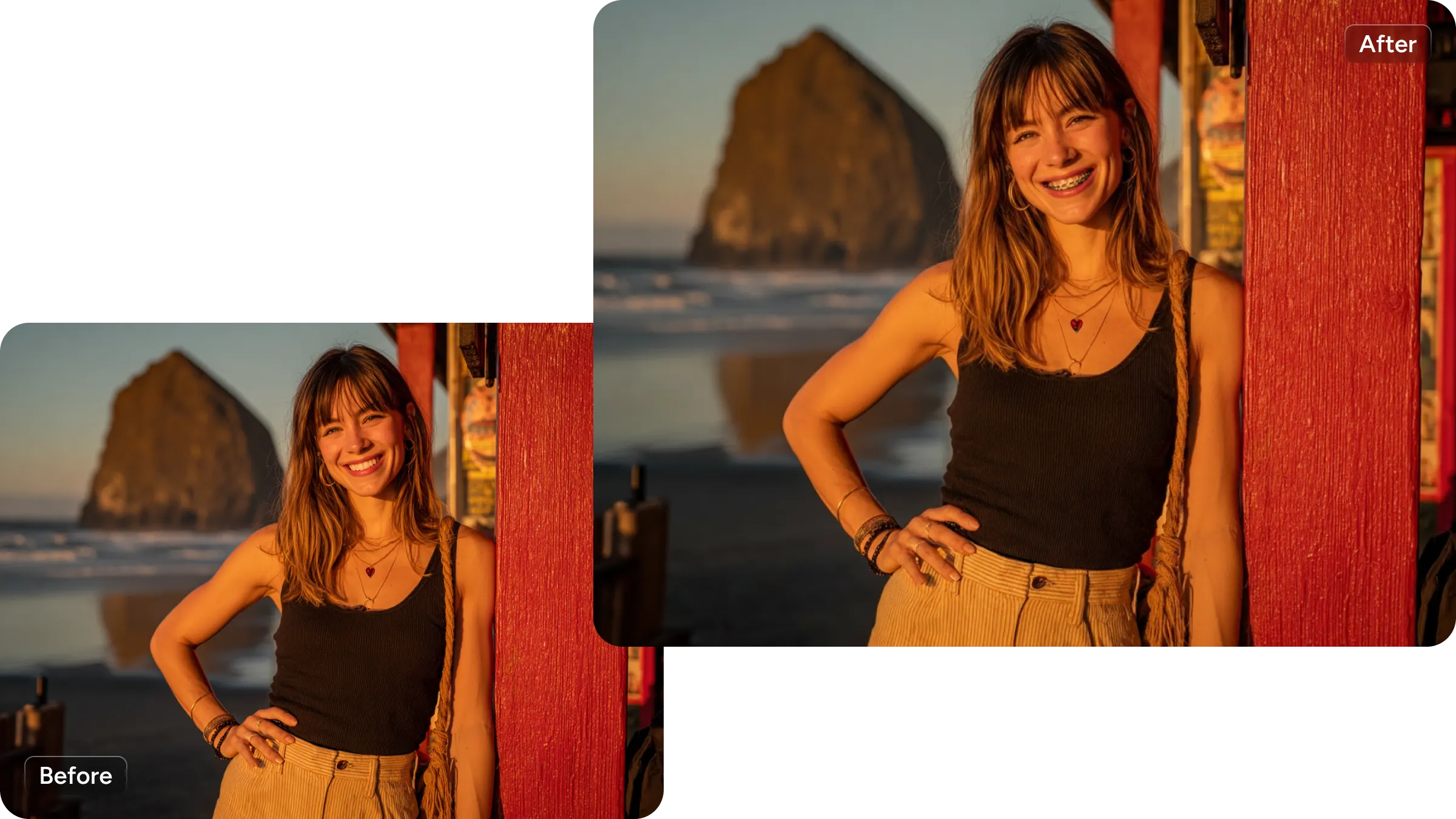
Have you ever wondered, "What would I look like with braces?" Our braces filter is designed to create a more natural and believable braces preview than typical filters. Instead of placing flat stickers on teeth, our braces simulator analyzes your smile, tooth alignment, and lighting to apply braces that follow the shape of your teeth and blend smoothly into the photo. Whether you're using it as a braces virtual try on or simply exploring how braces might change your appearance, this AI-powered braces generator helps you visualize the result clearly and confidently.
Why Use AIEase’s AI Braces Filter

Virtual Try-On Before Orthodontic Treatment
Preview braces on your own photo before making any decisions. This braces try on experience helps you understand how braces may look on your face, making it easier to explore orthodontic options in advance.

Compare Different Braces Types
See how different brace styles look on you. This braces filter supports trying different styles. Just tell the brace generator which type you need, then compare brace styles to find the one that feels right for you.

Preview Your Smile Transformation with Confidence
Braces can change how your smile looks, and that can feel uncertain. The braces filter helps reduce that uncertainty by giving you a clear visual preview, so you know what to expect before starting treatment.

Fast, One-Click Braces Preview Online
Simply upload your photo and let the online braces filter do the work automatically. Get your braces simulation in seconds without complicated tools or adjustments.

Create Fun and Shareable Braces Looks
Not just for planning — also great for fun. Use the braces simulator to create playful "with braces" photos for social media, group chats, or before-and-after style comparisons.

Privacy-Friendly Braces Simulation
AIEase's AI braces filter online allows you to try braces without sharing personal data or saving images permanently, so you can explore your look with confidence.
How to Use the AI Braces Filter
- Step 1
Upload a Clear Smile Photo
Choose a well-lit photo where your teeth are clearly visible. A front-facing smile works best for an accurate braces virtual try-on.
- Step 2
Preview Your Braces Look Instantly
Click the "Generate" button. And in seconds, the braces simulator generates a realistic braces preview, allowing you to see what you would look like with braces.
- Step 3
Download or Try Another Style
Save your image or test different brace looks using the online braces filter until you find the style you like.
Frequently Asked Questions
Have more questions? You can email service@aiease.ai, and we'll be happy to help you.
What is an AI braces filter?
An AI braces filter is a tool that uses artificial intelligence to add braces to a photo of your smile, allowing you to preview how braces might look on you.
Can I try braces online for free?
Yes. AIEase offers a free chance to try this online braces filter, so you can try braces on your photo without cost.
How accurate is the braces simulation?
The braces simulation is designed to be visually realistic, helping you get a clear idea of how braces may appear on your smile. Results may vary depending on photo quality.
Is my photo safe when using the braces filter?
Yes. AIEase won't save or share your uploaded photos. The uploaded images are processed securely and used solely for the intended purpose.